
CAD-ERP Integration: How BOM and Revision Transfer from SolidWorks Works
How does SolidWorks ERP integration work? BOM, technical drawing and revision transfer with CAD-ERP integration, configuration control, and its role in defense manufacturing.
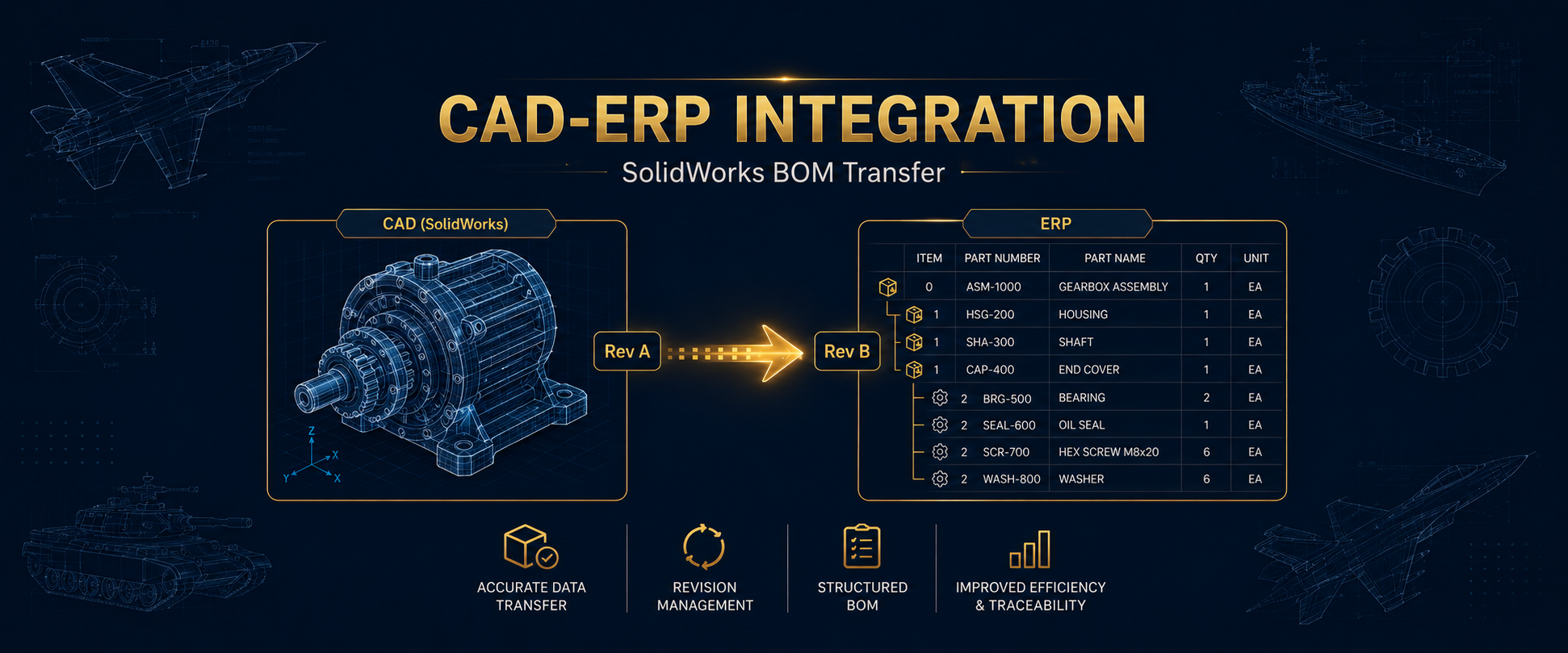
CAD-ERP integration is the automatic transfer of the bill of materials, technical drawings, and revision information created in a design environment (a CAD program such as SolidWorks) into the ERP system. Thanks to this integration, a design change made on the engineering side is reflected in production, procurement, and inventory processes without manual re-entry of data. In sectors where configuration control is mandatory, such as defense and aerospace, it is critically important because it eliminates the data disconnect between design and production.
The engineering team updates the revision of a part; but if this information is not entered into the ERP manually, production continues with the old revision. This disconnect is one of the most common causes of scrap cost and audit nonconformity in the defense industry. This guide explains what SolidWorks ERP integration is, how BOM and revision transfer work, and why this integration is critical in defense manufacturing.
What Is CAD-ERP Integration?
CAD-ERP integration is the establishment of an automatic data flow between computer-aided design (CAD) software and an enterprise resource planning (ERP) system. Part lists, material information, technical drawings, and revision numbers created on the design side are transferred directly into the ERP’s bill of materials structure.
Without integration, the two systems work unaware of each other: the engineer updates the design in SolidWorks, and someone tries to enter that change into the ERP by hand. This manual transfer is both a waste of time and open to data entry errors. With integration, the design becomes the single source of truth and production always works with current data.
What Is Transferred from SolidWorks to ERP?
A CAD-ERP integration typically carries the following data:
- Bill of materials (BOM): Assembly structure, sub-assemblies, and part-quantity relationships. For details on the BOM concept, see our bill of materials guide.
- Part records: Basic attributes such as part number, description, material, and weight.
- Technical drawings: Linking part and assembly drawings to the ERP so they are accessible on the shop floor.
- Revision information: Which part is at which revision and the revision history.
- Configuration data: Different variants of the same part (differences in length, material, options).
The automatic transfer of this data completely eliminates the manual entry burden, especially in defense assemblies consisting of hundreds of parts.
How Do BOM and Revision Transfer Work?
The integration typically proceeds through the following steps:
- Design is completed: The engineer creates the assembly and part list in SolidWorks.
- Data mapping: Part attributes in CAD are mapped to the corresponding fields in the ERP.
- Transfer: The bill of materials, part records, and drawings are transferred to the ERP.
- Revision control: The transferred data is recorded in the ERP with a revision number; the old revision is retained in history.
- Change propagation: When a revision is made in the design, the change is carried to the ERP and enters the ECN/ECO approval process.
- Transfer to production: The approved revision is reflected in production orders and purchase requests.
Summary: The real value of integration lies not in the first transfer but in revision management. In a defense project, a design can be revised dozens of times; carrying each revision manually is both impossible and risky. Automatic transfer reduces the revision gap between design and production to zero and eliminates the risk of producing with an old revision.
Why Is CAD-ERP Integration Critical in the Defense Industry?
In defense and aerospace, AS9100 and NATO AQAP standards require proof of which product was produced with which configuration. This is a requirement directly tied to CAD-ERP integration. The main reasons it is critical:
- Configuration control: The design revision and the production revision must always be the same. This is the foundation of configuration management and ECN/ECO processes.
- Complex assembly structures: Defense products consist of multi-layered assemblies; entering this structure manually is highly error-prone.
- Traceability: Which serial-numbered product was produced with which design revision must be on record.
- Audit evidence: The auditor asks for proof of consistency between design and production; an integrated system produces this automatically.
HarmonyERP’s SolidWorks Integration
This capability, absent from many ERP systems, is one of HarmonyERP’s concrete differentiators in engineering-intensive manufacturing. With the real capabilities defined on its defense solution, the integration provides:
- Transfer of SolidWorks technical drawings and bills of materials to the ERP: Design data is carried into the ERP instantly, eliminating manual data entry.
- Revision-controlled bill of materials: Engineering changes are automatically reflected in the BOM; which order was produced with which revision is recorded.
- ECN/ECO approval hierarchy: Transferred changes pass through a multi-level approval process; unauthorized changes cannot enter production.
- Blocking production with old revisions: Opening a new work order with an obsolete revision is prevented.
This integration works together with the production management module to run the entire chain — from design to work order, from procurement to inventory — on a single source of accurate data.
Common Mistakes in CAD-ERP Integration
- Starting without a part numbering standard. If CAD and ERP use different part number logic, the integration stalls from the outset.
- Thinking only about the first transfer. The real value is in the revision flow; without continuous synchronization, the system quickly becomes outdated.
- Skipping the approval process. Letting design changes flow directly into production disables ECN/ECO control and creates problems in audits.
- Ignoring configuration variants. If different variants of the same part are not mapped correctly, the wrong part is used in production.
- Not linking technical drawings to the ERP. If the shop floor cannot access the current drawing, the benefit of integration remains incomplete.
Frequently Asked Questions
What is CAD-ERP integration?
CAD-ERP integration is the automatic transfer of the bill of materials, part information, technical drawings, and revisions created in a design program such as SolidWorks into the ERP system. This way, design changes are reflected in production, procurement, and inventory processes without manual data entry, eliminating the data disconnect between design and production.
What is transferred with SolidWorks ERP integration?
Typically the bill of materials (BOM), part records (part number, description, material), technical drawings, revision information, and configuration variants are transferred. In assemblies consisting of hundreds of parts, this automatic transfer completely eliminates the manual data entry burden and the risk of error.
Why is CAD-ERP integration necessary in the defense industry?
AS9100 and NATO AQAP standards require proof of which product was produced with which configuration. CAD-ERP integration ensures that the design revision and the production revision are always the same; it eliminates the risk of producing with an old revision and generates evidence of consistency for audits.
How does a design change create risk without integration?
Without integration, the revision made on the engineering side is entered into the ERP manually. If this entry is delayed or skipped, production continues with the old revision. The result is scrap cost, rejected delivery, and a major nonconformity in the AS9100 audit. This is one of the most common errors in defense manufacturing.
How does HarmonyERP integrate with SolidWorks?
HarmonyERP transfers SolidWorks technical drawings and bills of materials into the ERP; engineering changes are automatically reflected in the revision-controlled bill of materials. Transferred changes pass through a multi-level ECN/ECO approval hierarchy, and opening a new work order with an obsolete revision is blocked.
Conclusion
CAD-ERP integration eliminates the data disconnect between engineering and production by automatically transferring the bill of materials, drawings, and revision data created in the design environment into the ERP. Its real value lies less in the first data transfer than in revision management: in defense projects where designs are revised dozens of times, reflecting changes into production accurately and on time directly reduces scrap cost and audit risk. The configuration evidence requirements of AS9100 and NATO AQAP are also met through this integration.
HarmonyERP’s SolidWorks integration and production management module transfer technical drawings and bills of materials into the ERP and keep every change under control with an ECN/ECO approval hierarchy. With 20+ years of enterprise software experience, we help aerospace and defense manufacturers establish a single data flow from design to production. To see our defense-specific solution live, request a free demo.
Related guides: Defense Industry ERP Solution · Production Management Module · Configuration Management and ECN/ECO
Transform Your Business with HarmonyERP
Manage manufacturing, accounting, inventory and sales from a single platform. Request a demo and see the difference.